Features
Every move,
mapped out.
One map in Fleetio. Every asset, place and service option in context — so your team can find, coordinate and act on asset data where it matters most.
Location data that earns its keep
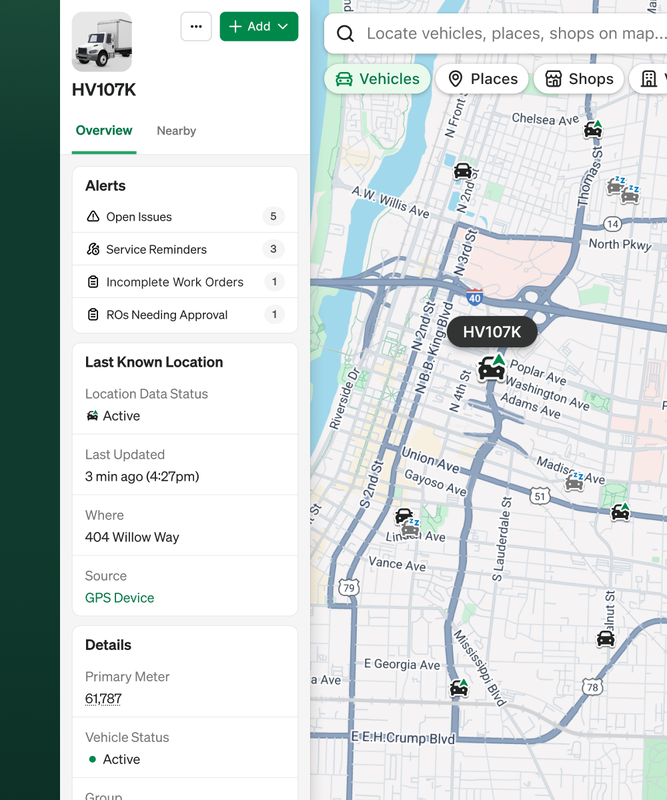
Find any asset. Know what to do next
Stop cross-referencing platforms. Fleet Map shows vehicles and equipment alongside yards, job sites, geofences and nearby vendors so the answer to "where is it" is in the same place as "what do we do next."
Works with whatever coverage you have
One telematics provider. Multiple. None. Fleet Map pulls location from supported providers and Fleetio-native updates — inspections, fuel entries, service records — so your team has visibility regardless.
Movement triggers action, automatically
When an asset enters or leaves a key location, Fleetio responds — alerts fire, statuses update. No check-in calls. No manual entry.
How it works

Open
the map
Vehicles, equipment, geofences and nearby vendors in one view inside Fleetio.

Location stays
current
Near real-time feeds from supported telematics integrations and Fleetio-native signals keep asset positions fresh.

Cross a boundary, trigger an action
Geofence events fire alerts and run automation actions in Fleetio — no manual follow-up needed.
Coordinate from
one place
Asset details, vendor context and service history in view. Make the call without switching tools.
Map. Monitor. Maintain.
One map, every source
Telematics providers format data differently. Coverage gaps happen. Fleet Map handles it, pulling signals across providers and Fleetio-native updates so your team always has the right answers.
Boundaries that work for you
Set up geofences around shops, yards and job sites. Get notified when assets arrive or leave. Let status updates run themselves.
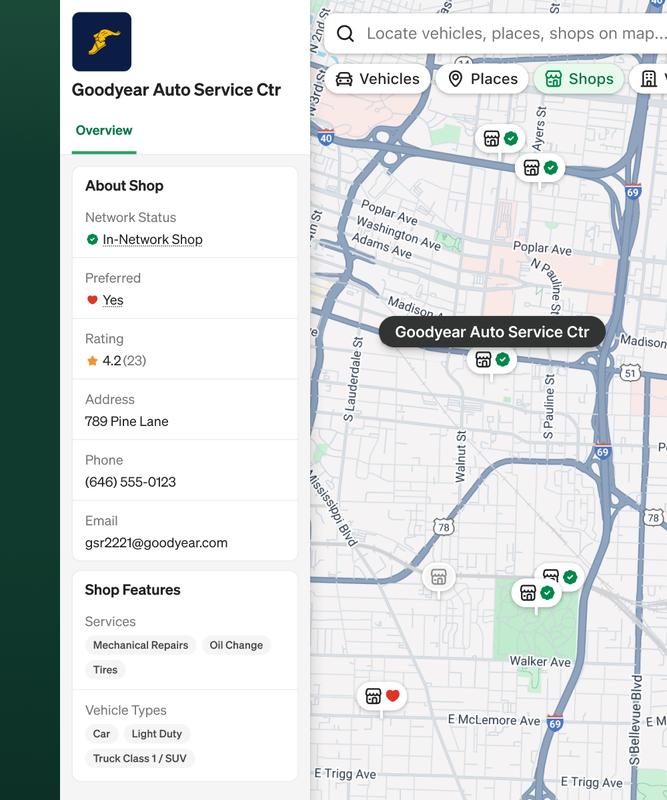
The vendor context you're missing
Toggle the shop layer. See nearby vendors right from the map, as well certifications and service history in your profile. Route faster. Call around less.
Core Capabilities
Unified map — vehicles, equipment, places, geofences and nearby vendors
Near real-time location across supported telematics integrations and Fleetio-native updates
Search and filter to find any asset fast
Automated status updates triggered by geofence entry/exit — configured in Fleetio Automations
Shop and vendor layer with certifications and service history
Radius and polygon geofence creation and management in Fleetio
Frequently Asked Questions
Explore other features
Preventive Maintenance Scheduling
Stay on top of PM tasks with scheduling and predictive service reminders.
Learn more→
Maintenance Vendor Network
Streamline maintenance provider orders, approvals, billing and data capture.
Learn more→
Workflow Automations
Save time and reduce errors on repeatable tasks
Learn more→
Ready to get started?
Join thousands of satisfied customers using Fleetio
Questions? Call us at 1-800-975-5304