What is a CMMS? Benefits, Features & How it Works
By bringing preventive maintenance, work orders, inspections, parts and service history into one system, a CMMS helps teams reduce downtime and make maintenance easier to manage. This guide explains how CMMS software works, its key benefits and features and how it compares to FMS, EAM and ERP systems.
Mar 27, 2023 | Updated: Aug 22, 2026
14 min read
What you need to know
-
A CMMS replaces disconnected tools with one connected system: Spreadsheets, paper forms, and shared inboxes give way to a single platform for preventive maintenance, work orders, inspections, parts, and service history.
-
Preventive maintenance works better when it's automated: Scheduling PM by time, mileage, or usage turns maintenance from a manual reminder into a predictable, auditable program that catches problems before they cause downtime.
-
Work orders create accountability from open to close: Every repair and maintenance task is assigned, tracked, and documented — giving managers real-time visibility without chasing updates across texts and spreadsheets.
-
Maintenance data becomes a strategic asset: A CMMS surfaces cost drivers, failure patterns, and compliance gaps that help teams make smarter decisions on staffing, parts procurement and repair-versus-replace.
-
Not all CMMS platforms are built the same: Facility, manufacturing, and fleet operations have different needs — and vehicle-centric fleets are better served by fleet management software designed around usage, inspections and compliance from the start.
The goal is to have one system that keeps maintenance work, history and costs connected. That's the core idea behind CMMS software. This guide covers what a CMMS is, how it works, how it compares to FMS, EAM, and ERP, the key benefits, and how to choose the right one. For many fleets, CMMS capabilities are delivered through fleet management software like Fleetio, where maintenance, inspections, and asset records are all housed together.
What is a CMMS?
CMMS stands for computerized maintenance management system. It is software that helps teams plan, track and document maintenance work across assets. At its core, a CMMS replaces the disconnected, manual tools that maintenance teams rely on, spreadsheets, paper forms and shared inboxes, with a single, connected system.
In practical terms, a CMMS:
- Turns preventive maintenance into scheduled work, not reminders on a calendar
- Standardizes work orders so repairs are trackable from open to complete
- Builds a searchable service history tied to each asset
- Tracks parts usage and inventory to prevent repairs from stalling
Before CMMS: Spreadsheets, paper forms, and disconnected tools. After CMMS: Schedules, work orders, inspections, parts, and reporting in one place.
CMMS software is relevant to any operation maintaining vehicles, equipment, facilities, or production assets.
Make their story your story
See how 3S Services centralized maintenance records, reviewed every repair recommendation and avoided more than $183,000 in unnecessary repair spend with Fleetio.
Read their story
What does a CMMS do?
A CMMS centralizes the maintenance operations that most teams manage across several different tools. Key capabilities include:
- Asset records and service history — Every asset has a profile with a complete, searchable maintenance history
- Preventive maintenance scheduling — PM tasks are scheduled by time, mileage or usage and triggered automatically
- Work order management — Repairs and maintenance tasks are assigned, tracked and documented from open to close
- Inspections and documentation — Digital inspection forms replace paper and attach directly to asset records
- Parts and inventory management — Stock levels, reorder points and part usage are tracked and tied to work orders
- Reporting and analytics — Maintenance data is surfaced as insights on costs, compliance, downtime and performance
- Mobile access and permissions — Technicians and managers can view and update records from any device, in the field
How a CMMS works
A CMMS follows a consistent end-to-end flow: assets are set up as a system of record, preventive maintenance is scheduled, maintenance needs are converted into work orders, inspections capture evidence, parts track costs and reporting surfaces trends. Here's how each step works in practice.
-
Set up assets as a system of record
Every asset gets a profile that becomes the home base for maintenance history, schedules and costs. In fleet environments, that profile includes VIN, odometer reading, engine hours, assignment and location. This makes every maintenance decision traceable back to a specific unit. -
Build a preventive maintenance program
Once assets are in the system, PM schedules are configured based on time (every X days) or usage (miles, engine hours, cycles). This converts preventive maintenance from a manual reminder into a predictable, auditable program. Overdue work is flagged automatically, and service history is recorded with every completed task. -
Turn maintenance needs into work orders
Work orders are the unit of work in a CMMS. They create visibility and accountability for every repair or maintenance task. A well-structured work order includes the issue, task list, priority level, assigned technician, due date, parts used, labor time, notes and photos. -
Capture inspections and evidence
Digital inspections replace paper forms and attach photos and notes directly to each asset record. This reduces back-and-forth between drivers, technicians and managers, and speeds up repair approvals. In fleet workflows, inspection issues often generate repair work orders automatically. -
Track parts so repairs don't stall
Parts inventory is managed directly within the CMMS, with stock levels, reorder points and part usage tied to individual work orders. This prevents repair delays caused by missing parts and gives teams cleaner cost attribution per asset and per repair. -
Use reporting to prevent recurring problems
Maintenance data is transformed into structured, analyzable insights. Teams can run reports on PM compliance, backlog, downtime and top cost drivers. Analyzing trends over time helps reduce surprises, accelerate turnaround and improve maintenance forecasting across the operation.
CMMS vs. FMS vs. EAM vs. ERP: What's the difference?
These four categories often get grouped together, but they serve different purposes and different users. The breakdown below helps clarify which system fits which need.
| CMMS | FMS | EAM | ERP | |
|---|---|---|---|---|
| Primary purpose | Day-to-day maintenance management | Fleet-specific maintenance, compliance, and usage tracking | Asset lifecycle strategy and capital planning | Business operations and financial management |
| Primary users | Maintenance managers, technicians, operations teams | Fleet managers, drivers, technicians | Asset managers, finance teams | Finance, operations, and executive leadership |
| Best for | Teams moving off spreadsheets; broad maintenance programs | Vehicle-centric operations with usage-driven maintenance | Organizations planning long-term asset acquisition and disposal | Enterprise-wide business operations |
| Where it falls short | Limited lifecycle modeling; may lack fleet-specific workflows | Less suited to non-vehicle asset types | Heavier to implement; overkill for day-to-day maintenance | Maintenance is often secondary or modular |
CMMS (computerized maintenance management system)
A CMMS is designed to manage day-to-day maintenance work — not the entire business or full asset lifecycle. It provides a centralized system for preventive maintenance scheduling, work order management, inspections, service history, parts, and inventory tracking. Built for technicians, maintenance managers, and operations teams, a CMMS is fast to implement and lower in cost and complexity than EAM or ERP — making it ideal for teams moving off spreadsheets or paper-based systems.
Limitations: Limited financial planning or asset lifecycle modeling. Generic CMMS platforms may also lack fleet-specific workflows, requiring workarounds for vehicle usage, inspections, and compliance tracking.
FMS (fleet management software)
Fleet management software is a fleet-first version of CMMS capabilities, with vehicle, driver, compliance and usage-based realities built in from the start. When vehicles are the main assets and maintenance is driven by usage and inspections, FMS is typically the better fit than a general-purpose CMMS.
EAM (enterprise asset management)
EAM platforms focus on asset lifecycle strategy and capital planning to include acquisition, procurement, maintenance and disposal. Maintenance is one component of the larger lifecycle model, which makes EAM more appropriate for organizations managing high-value, long-lived infrastructure assets across their full operational life.
ERP (enterprise resource planning)
An ERP is a business operations and finance system. Maintenance functionality is often secondary or modular, added through integrations rather than built as a core workflow. ERP works well alongside a CMMS for financial tracking and procurement but isn't a replacement for maintenance-focused tools.
Who uses a CMMS?
CMMS software is used across a wide range of industry verticles. You can find them anywhere assets require regular maintenance and organizations need an accurate, auditable record of that work.
Fleets
Fleets use CMMS software to manage maintenance operations for vehicles that are constantly in motion and accumulate usage quickly. Usage-based PM scheduling, digital inspections, and automated work orders help fleet teams reduce downtime and keep vehicles road-ready without relying on manual tracking. For vehicle-centric operations, fleet management software like Fleetio is purpose-built around these realities.
Healthcare
Healthcare organizations rely on CMMS to maintain critical medical equipment where uptime directly impacts patient care. Accuracy, documentation, and reliability aren't optional — they're operational requirements. A CMMS ensures every maintenance task is logged, timestamped, and retrievable for audits or incident review.
Manufacturing
Manufacturers use CMMS to keep production equipment running and avoid costly line stoppages. Preventive maintenance scheduling, downtime tracking, and failure analysis help manufacturing teams move from reactive repairs toward more predictable, planned maintenance programs.
Utilities
Utilities depend on CMMS to manage widely distributed, long-lived infrastructure assets: power lines, substations, treatment facilities, and more. Minimizing service disruptions requires tight scheduling, fast work order response, and detailed asset histories, all of which a CMMS supports at scale.
Government
Government agencies use CMMS to maintain public assets while meeting transparency and accountability requirements. Standardized processes across departments, documented service histories, and audit-ready records help agencies demonstrate responsible asset stewardship.
Education
Educational institutions use CMMS to manage campus facilities, equipment, and transportation assets. Scheduling maintenance proactively helps keep campuses safe, operational and within budget.
Hospitality
Hospitality organizations use CMMS to maintain the facilities and equipment that the guest experience depends on. Reliability is directly tied to brand standards and service quality, making it essential that preventive maintenance stays on schedule and repair response times stay short.
Benefits of using a CMMS
Improved asset reliability
Without a CMMS, maintenance is often driven by visible failure or gut instinct. A CMMS changes that by scheduling maintenance based on time, usage, or condition — before problems occur. Service histories and PM schedules help teams get ahead of issues rather than respond to them, which reduces wear, extends useful asset life and keeps operations running.
Greater maintenance efficiency
A CMMS centralizes work orders, schedules, and documentation, eliminating the manual coordination that slows maintenance teams down. Technicians spend less time on paperwork and more time on actual repairs. Managers gain real-time visibility into workload and status without chasing updates across spreadsheets or text threads.
Stronger regulatory compliance
A CMMS creates a defensible record of every maintenance activity and corrective action. Documentation is timestamped and easy to retrieve, which transforms compliance from a reactive scramble into a proactive practice. For fleets, this means inspection records, service logs and PM histories are audit-ready at any time.
Better inventory control
A CMMS links parts usage directly to work orders and assets, giving teams visibility into what's being used and what needs replenishment. Inventory decisions are based on actual maintenance demand rather than guesswork, which reduces both stockouts and excess carrying costs.
Enhanced safety
Well-maintained assets are safer to operate and less likely to fail unexpectedly. A CMMS enforces inspection schedules to ensure safety-critical work isn't skipped and creates a maintenance history that supports incident investigation and prevention. For fleet operators, this directly reduces driver risk and organizational liability.
Actionable maintenance insights
A CMMS turns maintenance activity into structured, analyzable data. Leaders can identify cost drivers, spot recurring failure patterns, and benchmark performance across assets or locations. Maintenance planning becomes strategic instead of reactive — with reporting that supports better decisions on staffing, procurement, and capital investment.
Review every repair the moment it hits
See how Fleetio AI Service Advisor helps maintenance teams review repair recommendations faster, flag unnecessary services and make more informed approval decisions before work begins.
Learn more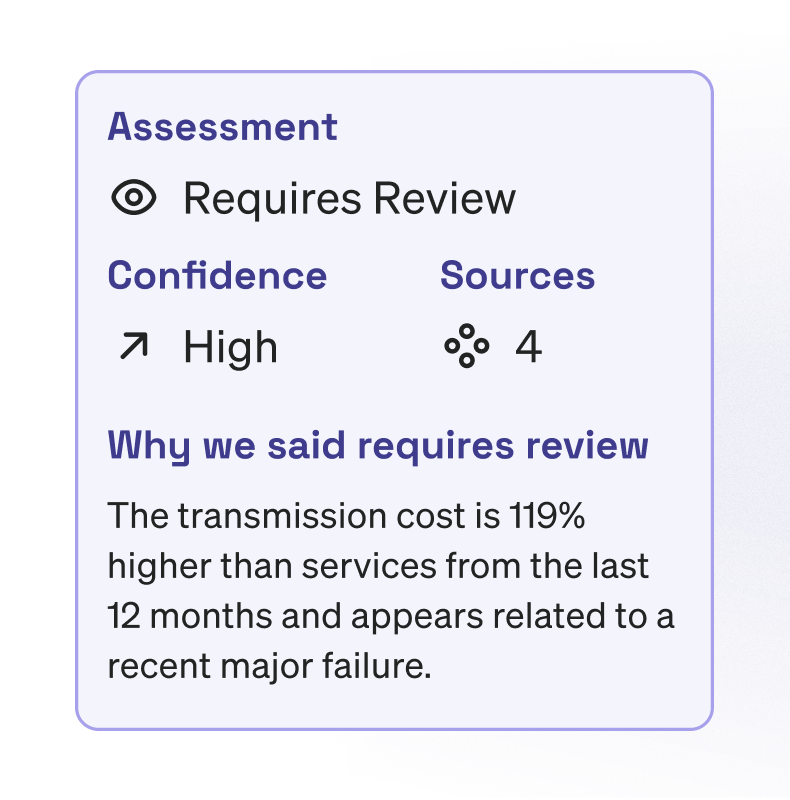
Best CMMS software by use case
Choosing CMMS software comes down to fit: which platform is designed for the kind of maintenance work your team does every day? Below is an evaluative overview of leading tools organized by the use case each one is best suited for.
Fleetio — Best for fleet maintenance
Best for: Vehicle-centric fleets managing preventive maintenance, inspections, compliance, and parts across many units. Organizations where maintenance is tightly tied to vehicle usage, mileage, and inspection outcomes.
Strengths: Fleetio is fleet maintenance software built around fleet-specific workflows. Vehicles, inspections, service events, and recalls are first-class objects in the system — not add-ons. A mobile-first design means technicians and drivers can complete inspections, log issues, and close work orders in the field without needing to be at a desktop. Automated fleet management capabilities and a large integrations library help teams connect their existing tools and reduce manual data entry.
Potential limitations: Fleetio is purpose-built for fleets. Teams with mixed-asset environments (facilities plus vehicles) may need additional tools to cover non-vehicle assets.
MaintainX — Best for facility maintenance
Best for: Teams managing buildings, campuses, or distributed facilities. Organizations prioritizing fast issue reporting and technician communication.
Strengths: Mobile-friendly work order creation and completion, simple PM scheduling for HVAC, electrical, plumbing, and general facilities, and in-app messaging and notifications that improve response times.
Potential limitations: Less suited to vehicle-centric operations or usage-based maintenance triggers at scale.
Limble CMMS — Best for machinery maintenance
Best for: Manufacturing and industrial environments with complex machinery. Teams tracking uptime, failures, and maintenance KPIs like MTBF and MTTR.
Strengths: Detailed asset records with failure codes and downtime tracking, robust preventive and predictive maintenance workflows, and reporting aligned to manufacturing KPIs.
Potential limitations: Configuration complexity may exceed what smaller teams or simpler programs need.
Fiix — Best for property maintenance
Best for: Property managers overseeing multiple sites or mixed-use assets. Teams balancing preventive maintenance with tenant-driven work requests.
Strengths: Location-based asset tracking, preventive maintenance scheduling across sites, and customizable workflows for tenant requests and vendor coordination.
Potential limitations: Less optimized for fleet or vehicle-specific workflows.
Hippo CMMS — Best general CMMS solution
Best for: Small to mid-sized organizations needing broad CMMS functionality. Teams without highly specialized maintenance requirements.
Strengths: Straightforward asset and work order management, preventive maintenance scheduling without heavy configuration and an accessible onboarding experience for teams new to CMMS adoption.
Potential limitations: May lack the depth needed for complex manufacturing programs, large fleets, or multi-site operations.
Choosing the right CMMS
The right CMMS isn't the one with the most features — it's the one that keeps maintenance data accurate with minimal manual effort as your operations grow. The best way to evaluate options is to match your current maintenance challenges to each platform's core design.
Facility-first platforms like MaintainX or Fiix work well for buildings and static assets. General CMMS platforms like Hippo suit smaller programs without specialized requirements. Machinery-focused tools like Limble shine in manufacturing environments with complex equipment and KPI-driven reporting.
For fleets, these tools often require workarounds to handle vehicle usage data, inspection workflows, compliance tracking, and mobile data capture at scale. Fleetio is designed around these realities from the start — maintenance, inspections, costs, and compliance are connected without requiring heavy customization. If vehicles are your primary assets and maintenance is driven by mileage, hours, and inspections, a fleet-first CMMS is worth evaluating on its own terms.
For a deeper look at building a structured maintenance program, see the maintenance management guide.
Frequently asked questions
Is a CMMS worth it for small fleets or teams?
Yes, even small fleets benefit from moving off spreadsheets. A CMMS replaces manual tracking with automated PM reminders, structured work orders, and a documented service history, which reduces missed maintenance and makes it easier to demonstrate compliance. For small teams, the efficiency gain per person is often more significant than at scale, since every missed task or manual handoff has a proportionally larger impact on operations.
Can a CMMS integrate with other fleet or business systems?
Most modern CMMS platforms offer integrations with telematics providers, fuel card systems, accounting software and ERP platforms. Fleetio, for example, connects with a wide range of fleet tools so that odometer readings, fuel data, and asset assignments flow into maintenance records automatically — reducing duplicate data entry and keeping records accurate without manual syncing.
How long does it take to implement a CMMS?
Implementation timelines vary by platform and program complexity. Cloud-based CMMS software can often be configured and operational within days to a few weeks. Larger programs with many assets, complex PM schedules, or data migration requirements may take longer. Most teams find that starting with a core asset list and a basic PM schedule, then expanding from there, keeps the process manageable and reduces the risk of an incomplete rollout.
What's the difference between cloud-based and on-premise CMMS software?
Cloud-based CMMS software is hosted by the vendor and accessed through a browser or mobile app — no local installation required. Updates are applied automatically, and data is accessible from any device. On-premise CMMS software is installed on local servers, giving organizations more control over data storage but requiring internal IT resources to maintain. Most teams today choose cloud-based systems for the lower upfront cost, easier mobile access, and faster deployment.

Senior Fleet Content Specialist
As a Senior Fleet Content Specialist at Fleetio, Peyton explores the voices and experiences that shape fleet operations. She focuses on how fleet professionals adopt technology, improve efficiency and lead their teams to bring clarity and context to the challenges happening across the industry.
View articles by Peyton Panik
Senior Copywriter
Tyler Freeland is a Senior Copywriter at Fleetio. A former creative writer for Freightliner and Western Star, he now transforms complex (and sometimes common) fleet topics into practical, engaging insights that fleet leaders can apply every day.
LinkedIn|View articles by Tyler FreelandReady to get started?
Join thousands of satisfied customers using Fleetio
Questions? Call us at 1-800-975-5304