Features
Workflow Automations
Customers using Automations save an average of 10hrs/mo
Save time and reduce errors by automating repetitive fleet tasks. Build workflows that automatically address critical issues in real time, ensure consistent approvals and keep your data reliable. With customizable triggers, conditions and actions, Workflow Automations help you minimize downtime, control costs and keep your team focused on what matters most.
How it works

Choose a trigger
Issue identified, work order resolved, PO submitted — pick the event that should kick things off.

Add conditions
Control when automations run, based on severity, asset type, team, amount, and more.
Define actions
Create or update Work Orders, change asset status, notify approvers, add comments with @mentions and email teammates.

Review & enable
Confirm the summary, then turn it on. Edit anytime as your process evolves.
Keep your assets moving and your team in sync
Reduce downtime by addressing issues in real time
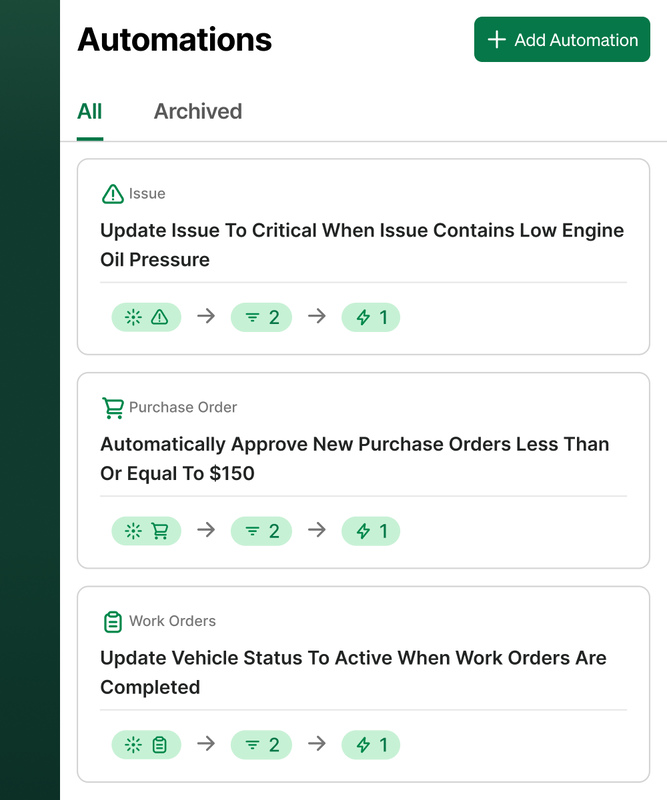
Identify, triage and act, automatically. Trigger status changes, notify the right people and create and assign Work Orders the moment a critical issue is logged or an inspection item fails. When Work Orders close, Automations update vehicle status so everyone knows the asset is back in service.
Cut maintenance costs with automated, policy-driven decisions
Apply consistent rules to approvals and updates so nothing falls through the cracks. For example, set PO approval thresholds to auto‑approve low‑dollar POs and auto‑reject out‑of‑policy submissions, keeping techs moving without sacrificing control.
Fleet data you can trust
Every automated change is time‑stamped and tied to the right record, so your asset statuses, Work Orders and POs reflect reality. Less manual entry means fewer mistakes — and better decisions.
Core Capabilities
Trigger library activates automations across fleet records, including Work Orders, Issues & Purchase Orders (e.g., created, closed, submitted, resolved)
Flexible conditions let you tailor workflows based on variables such as groups, asset types, locations, priorities, and cost thresholds.
Record creation & updates to automatically open Work Orders and set Vehicle Status (In Shop, Out of Service, Active)
Policy-based PO approvals to auto-approve low-dollar POs and auto-reject out-of-policy submissions
Dynamic notifications with variables like Service Task, Asset Name and WO # for instant context
Comprehensive audit trail with every action time-stamped for clear accountability and oversight
Frequently Asked Questions
Explore other features
Digital Work Orders
Plan, schedule and track detailed maintenance tasks and costs.
Learn more→
Vehicle Inspections
Maintain compliance and eliminate pencil whipping with electronic vehicle inspections.
Learn more→
Issue Management
Boost efficiency and maximize uptime by prioritizing issues in your fleet.
Learn more→
Ready to get started?
Join thousands of satisfied customers using Fleetio
Questions? Call us at 1-800-975-5304