Mileage Log Template: Free Download for Fleet Tracking
A mileage log template is a ready-made document designed to help drivers and fleet managers record trips, odometer readings and trip purposes. Whether you're managing a growing fleet or driving your personal vehicle for work, keeping an accurate mileage log is essential for.
Dec 22, 2025
10 min read

Good mileage tracking is more than a finance chore. Those odometer readings drive preventive maintenance schedules, cost-per-mile, utilization and audit readiness. When mileage logs are late or inconsistent, you feel it fast: missed service, higher operating costs and more compliance risk.
Mileage log templates are a practical first step. A mileage log template (paper log book, Excel, or Google Sheets) helps standardize business mileage across drivers and vehicles and supports IRS documentation for tax deductions and reimbursement.
In this guide, you’ll get a free mileage log template, the fields a compliant log should include, the most common spreadsheet mistakes, and when automated mileage tracking makes more sense as your mileage tracking needs grow.
What is a mileage log?
A mileage log is a straightforward record-keeping system for vehicle mileage. For each business trip (or day of use), log the date of the trip, driver, vehicle or asset ID, starting and ending odometer readings, total miles driven, and the purpose of the trip. The closer you record it to the time of travel, the more accurate your mileage records will be.
Mileage logs usually serve two audiences:
- Tax and compliance teams, who need IRS- (and HMRC-, where applicable) compliant documentation to support business expenses, tax deductions, reimbursement, and audit requirements tied to a tax return.
- Fleet operations teams, who use business miles to trigger preventive maintenance, track cost per mile, monitor asset utilization, and plan replacement timing.
When mileage data is delayed or incomplete, the impact goes beyond paperwork. One bad odometer entry can push service intervals off track, distort cost reporting, and hide how a vehicle is actually being used.
Key reasons fleets need a mileage log
A mileage log (paper log, log book, or mileage log book) helps you:
- Document business use and separate business-related miles from personal trips for a mileage deduction.
- Keep reimbursements consistent and defensible.
- Base maintenance schedules on real mileage, not estimates.
- Trust your reporting (cost per mile, total mileage and utilization) without the hassle of reconciling multiple spreadsheets.
Relying too heavily on individual staff, a calendar on the wall, or walking around the yard checking [vehicles] – it just doesn't work. You need something where you've got metrics that are coming in and vehicles getting flagged for reminders, and operating within the system to then bring them in for the service. Josh Baker, DASH Public Transit
What should a mileage log include?
An IRS-compliant mileage log is a consistent, detailed record of each business trip. Log it at the time of travel when you can (daily or weekly is usually fine), as long as the information is accurate, complete and easy to verify if you ever need it for an audit.
IRS (and HMRC) rules set the baseline for mileage documentation. Fleets typically go a step further, because the same mileage data that supports tax deductions also drives preventive maintenance, cost-per-mile reporting, and long-term asset planning. The right fields keep you audit-ready and make the data useful day to day.
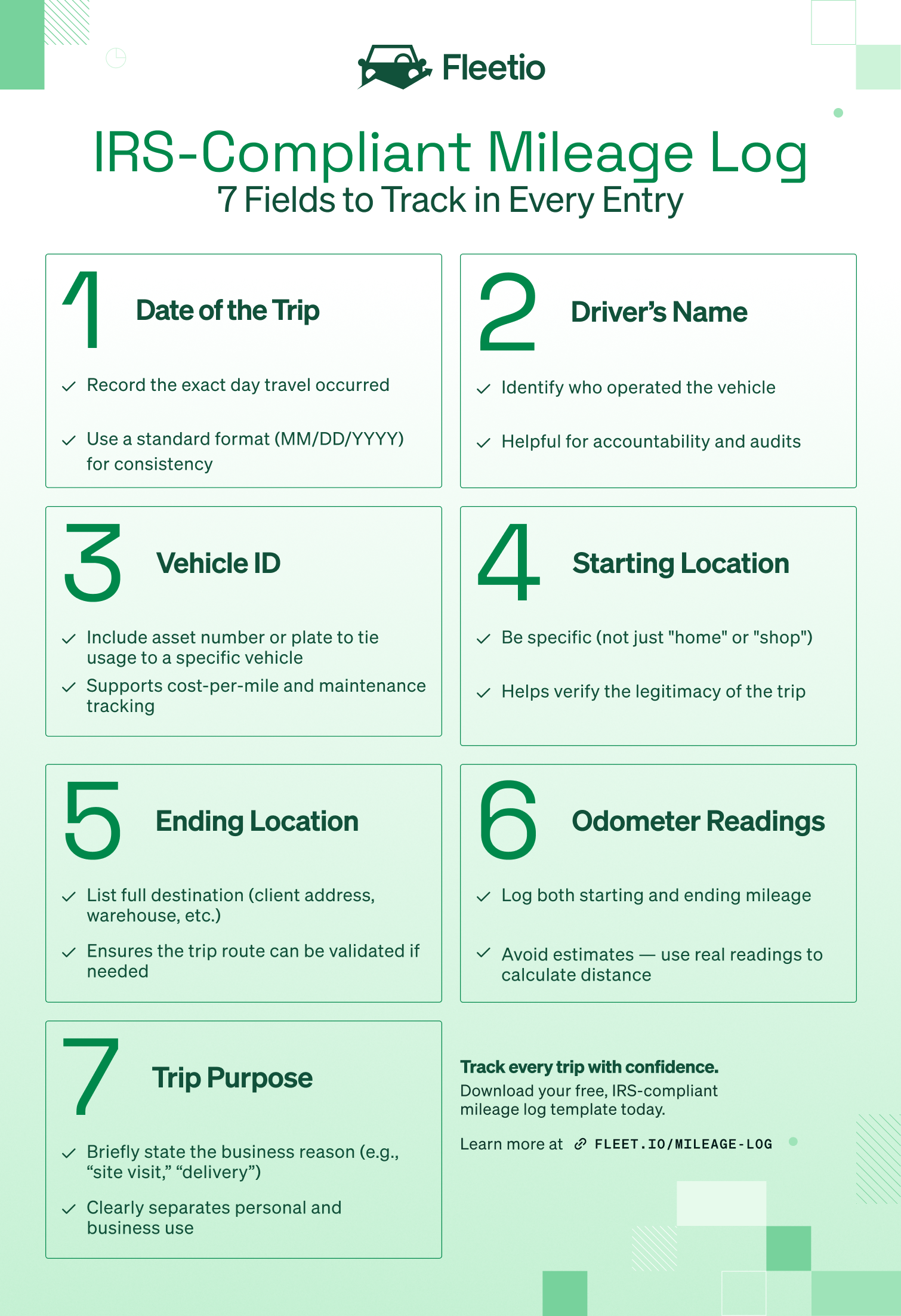
Date, start/end odometer readings, and total miles
Capture the trip date, starting and ending odometer readings, and total miles driven (and pulled from the vehicle’s odometer, not a guess). That accuracy matters when service intervals and cost per mile are tied to mileage.
Trip purpose or business purpose
This is where you document why the miles qualify as business use. “Meeting” is a start, but a little more context (who/where/why) makes your mileage records much more defensible and helps validate reimbursement.
Driver name or operator identification
Every entry should show who drove. It’s the difference between “our numbers look weird” and “we know exactly where to look.” It also keeps mileage logging consistent across the team.
Vehicle or asset identification number
Track mileage by asset using a fleet ID or license plate number (not just “the Ford"). This is what ties mileage to maintenance history, utilization, and lifecycle decisions.
Additional fleet fields (engine hours, location, cost-per-mile data)
Not required by the IRS, but often worth it. Engine hours matter for heavy equipment and mixed fleets where miles don’t tell the whole story. GPS location and cost-per-mile fields can also help surface anomalies early (fuel fraud, mileage spikes, underused vehicles).
Note
IRS mileage requirements apply across the United States. Be sure to also check for any state-level mileage or reimbursement rules if applicable.
Mileage log template (free download)
Mileage log templates are still a great fit when you want to standardize mileage tracking, but you’re not ready to automate it yet. If your team is coming from paper logs, a mileage log book, or a handful of spreadsheets floating around, a single template brings everyone onto the same page—without asking drivers to overhaul how they work overnight.
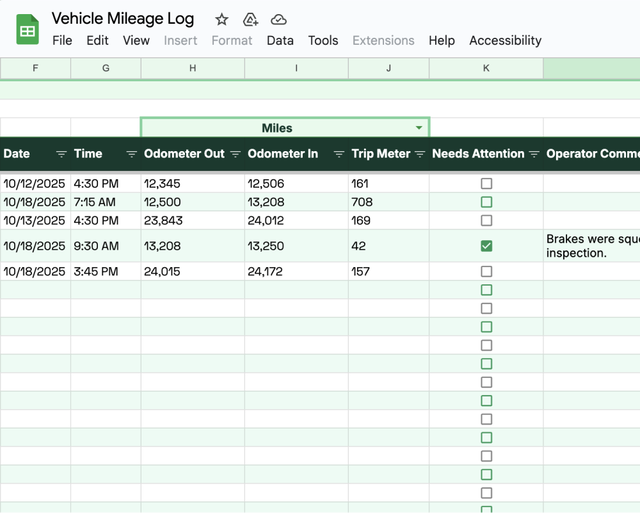
Fleetio’s free mileage log template is built to be that first step. It captures the required fields for IRS compliance, while also making it easier to spot gaps and inconsistencies before they turn into bigger reporting or maintenance issues.
Choose the format that fits your workflow:
- Excel for offline tracking
- Google Sheets for shared, cloud-based logging
- PDF for a simple, printable mileage log
Download the free mileage log template
One quick note: a template only works if the process around it is consistent. Clear expectations – when mileage gets logged, who reviews it, and where it lives – are what turn a spreadsheet into a mileage record you can actually trust.
What’s included in the free Fleetio template
This isn’t just a blank mileage log spreadsheet. The template includes a few extras to help you stay organized:
- Prebuilt vehicle list with editable asset IDs, vehicle types, and driver assignments
- Operator comments field to capture context (detours, extended idling, unusual routes)
- Vehicle attention checkbox to flag anything that needs follow-up
- Assignment history view to review mileage logs by asset and spot trends over time
How to use the mileage log template
A mileage log template only works if it’s used the same way, every time. The goal is a mileage record you can trust that is built from real vehicle usage, not something you’re trying to piece together at the end of the month.
For each business trip, have drivers log:
- Date of travel
- Start and end locations
- Starting and ending odometer readings
- Total miles driven
- Trip purpose / business purpose
You should make an entry right after the trip (or at least the same day). Weekly updates can work, but the longer you wait, the more details become guesswork, and that’s where mileage logs start to fall apart for IRS documentation, reimbursement and fleet reporting.
Spreadsheets work – until they don’t
With Fleetio Go, drivers can log mileage from the field – no spreadsheets, no delays. Get instant visibility into asset usage and keep records IRS-ready, in real time.
Simplify mileage tracking
Common mileage logging mistakes (and how to avoid them)
Most fleets don’t struggle because they don’t have mileage logs. They struggle because their mileage log turns into a “best effort” process with different formats, missing fields, and entries that show up days later. That’s when mileage data stops being useful for compliance or operations.
Here are the most common mileage logging mistakes (and what to do instead).
Logging trips inconsistently or after the fact
When drivers log mileage at the end of a shift (or worse, at the end of the week) details get guessed: odometer readings, destinations, trip purpose. Those gaps add up fast.
How to avoid it:
- Set a simple rule: log mileage right after each business trip (or same day)
- Make it easy with a mobile-friendly template and a clear SOP
- If you have integrations, use automated mileage tracking so drivers aren’t relying on memory
Forgetting required details like trip purpose or odometer readings
This is where audit risk shows up. Missing trip purpose, estimated miles, or skipped odometer readings makes it harder to prove business use and defend reimbursement.
How to avoid it:
- Use a standardized mileage log template with required fields (no blanks)
- Train drivers on why those fields matter, not just where to type
- Use DVIRs or automated odometer updates to capture mileage consistently
Relying on paper logs that get lost or damaged
Paper mileage logs disappear. They get wet, tossed, left in a glove box, or “lost” right when you need them. Then you’re rebuilding mileage records from memory (which is never great for the IRS).
How to avoid it:
- Move to digital logs in Google Sheets or a mileage log spreadsheet as a quick win
- Store everything in one centralized location that ops + finance can access
- If you’re ready, use automated mileage capture to cut down admin time and errors
Using multiple templates or formats across drivers and locations
If each site has its own spreadsheet (or its own way), your data won’t roll up cleanly. Reporting becomes a manual cleanup project, and cost-per-mile comparisons get shaky.
How to avoid it:
- Roll out one mileage log template across the fleet
- Set expectations: when to log, who reviews, and what done looks like
- Use a centralized system like Fleetio to enforce the same process everywhere
Missing or incorrect mileage data that skews cost and compliance reporting
A few bad entries can throw off preventive maintenance schedules, inflate cost-per-mile, or hide underused vehicles. Over time that turns into reactive repairs, downtime, and poor replacement decisions.How to avoid it:
- Do lightweight supervisor reviews to spot obvious anomalies
- Validate mileage against fuel card data or telematics
- Unify fuel, mileage, and service history so issues show up early instead of at audit time
Simplify mileage tracking with Fleetio
Mileage log templates are a great starting point, but they’re still manual. And once your fleet grows (or reporting expectations get tighter), spreadsheets get harder to police. Missed entries, late updates, and “wait, which version is the right one?” become part of the routine.
That’s why a lot of fleets move to a system that updates mileage automatically, without asking drivers to do more.
Fleetio simplifies mileage tracking by capturing and validating mileage data in the background, so you get cleaner records with less manual effort.
Automated mileage capture without driver intervention
Fleetio automates mileage tracking using multiple sources, so you’re not dependent on a single manual process:
- Telematics integrations pull odometer readings from providers like Geotab, Motive, and Samsara
- Fuel card integrations validate mileage entries and flag anomalies (sudden jumps, mismatches, gaps)
- DVIRs capture odometer readings during daily inspections—start of day, end of day, or both
When those sources align, you get a mileage record with built-in checks and fewer surprises.
Operational insights powered by accurate mileage data
Accurate mileage data goes beyond compliance. It’s an operational input you can actually run the fleet on.
With automated mileage tracking in Fleetio, fleets can:
- Trigger preventive service schedules based on real usage
- Improve cost-per-mile reporting and identify inefficient assets
- Support total cost of ownership (TCO) and lifecycle planning with reliable utilization data
One of the things Fleetio has forced us to learn is accuracy, because if there’s a mistake made, everything is interconnected. It affects the mileage that’s shown on the vehicle, the reminders for vehicle maintenance — it messes up everything. Robert Johnson, Kayak Public Transit
Instead of chasing spreadsheets (or fixing errors after the fact), you get real-time visibility, and more confidence in the numbers you’re using to make decisions.
Ready to stop chasing spreadsheets?
See how Fleetio can simplify mileage tracking and streamline compliance across your fleet — with real-time visibility, automated logging, and audit-ready reports.
Book a demo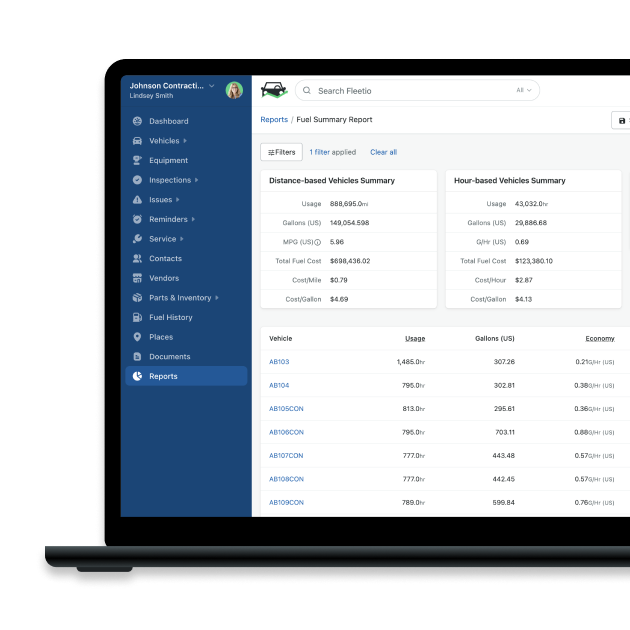

Director of Fleet Content, Fleetio
Zach Searcy is the Director of Content at Fleetio with more than 5 years of experience in the automotive and fleet industries. His content creation days started in middle school when he and his friends began filming lightsaber battles to upload to a new website: 'YouTube.'
LinkedIn|View articles by Zach SearcyReady to get started?
Join thousands of satisfied customers using Fleetio
Questions? Call us at 1-800-975-5304