Features
Motor Pool
Manage shared vehicle requests, approvals, assignments and costs in one place. And get the usage data you need to support better decisions around utilization, budgeting, chargebacks and fleet right-sizing.
The simplest way to share vehicles across your fleet
Make shared vehicles easier to access
Reduce confusion and wait time for drivers by submitting requests in Fleetio Go (mobile or web) and controlling access by user or group — so the right people see the right pools and vehicles ready for use.
Learn more→Bring structure to motor pool operations
Get reservations updates out of email and spreadsheets by approving, adjusting or denying requests in one place — or using auto-approval rules to cut manual work without losing oversight.
Learn more→Turn usage data into better fleet decisions
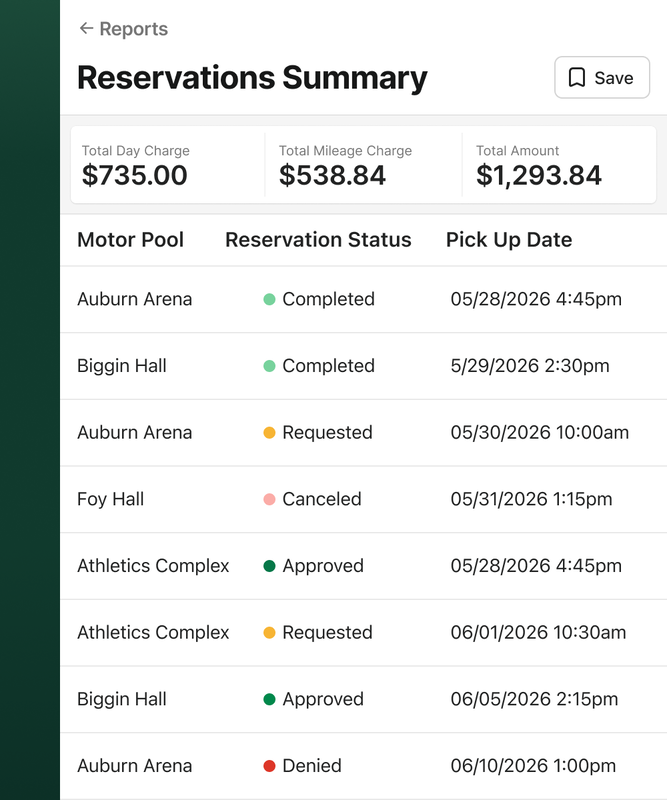
Gain a clearer understanding of how your fleet vehicles are really being used — by tracking and reporting on reservation history, time used and costs to reveal demand, utilization, and spend across departments.
Learn more→All your motor pool needs, in one place
Request vehicles via Fleetio Go
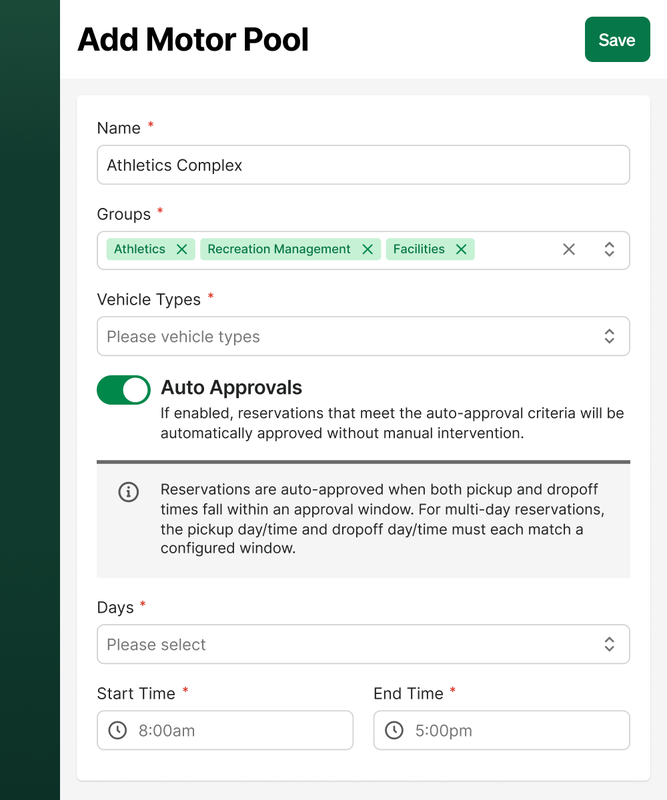
Set up auto-approvals
Track department chargebacks
Prevent double-bookings
Capture reservation costs
Report on usage and demand
Connect to key access with KeyCafe
Keep a full reservation history
Manage more than just reservations
Asset Management
Every shared vehicle in your motor pool is connected to its full asset record in Fleetio. Keep track of maintenance history, inspection status, and vehicle details — all in one place, not spread across disconnected systems.
Learn more→User Management
Control who can request vehicles, manage reservations, and approve requests. Set access by role, group, or location so only authorized users participate in the workflow.
Learn more→Cost Tracking
Add daily charges, mileage fees, and miscellaneous costs to completed reservations. That data feeds department chargebacks, internal billing, and budget reconciliation — without extra legwork.
Learn more→Reporting & Utilization
See which shared vehicles are in demand, how often they're being used, and what they cost to operate. Use that data to support rate adjustments and right-sizing decisions before approving a new asset purchase.
Learn more→Request. Reserve. Report.
Set up your motor pool
Define which vehicles are available, which vehicle types are included, and which groups or users can access them. Whether you're launching a new program or replacing a manual process, setup is straightforward.

Users request vehicles
Approved employees submit requests from the Fleetio Go mobile app or web — no inbox required. Admins control access, so only the right people can submit.
Review & assign
Approve, adjust, or deny requests from one place. Configure auto-approval rules for predictable scenarios to reduce manual work without giving up oversight.
Set rates & report back
Set flexible billing rates, automatically capture reservation costs, review usage history and report on vehicle demand — all inside Fleetio.
Frequently Asked Questions
Explore other features
Vehicle Inspections
Maintain compliance and eliminate pencil whipping with electronic vehicle inspections.
Learn more→
Notifications
Stay informed on critical tasks for your vehicles and equipment and collaborate with your team from anywhere.
Learn more→
Preventive Maintenance Scheduling
Stay on top of PM tasks with scheduling and predictive service reminders.
Learn more→
Ready to get started?
Join thousands of satisfied customers using Fleetio
Questions? Call us at 1-800-975-5304